
This product is also available on the Microsoft Store.
Selecting the Microsoft Store version will open the store page.
Selecting the MSI or ZIP version will immediately start downloading the package.
The MSI, ZIP, and Microsoft Store versions differ only in packaging format; the application itself is identical across all versions.
Product Download
After downloading, please refer to this page to get started with Logging Foot.
Logging Foot Free Edition for Windows x64
| 2026-02-10 | ver 1.1.0.2 | LoggingFoot-1.1.0.2-free | Microsoft Store Version Download MSI Version Download ZIP Version |
| 2026-01-16 | ver 1.1.0.1 | LoggingFoot-1.1.0.1-free | Not available |
Logging Foot Pro Trial Edition for Windows x64
| 2026-0x-xx | -------- | -------- | Coming Soon |
Logging Foot Pro Edition for Windows x64
| 2026-0x-xx | -------- | -------- | Coming Soon |
About the Warning Displayed When Downloading the MSI Version
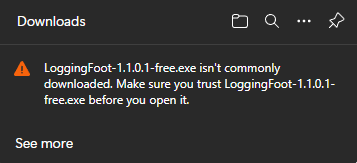
Depending on your security settings, your browser—such as Microsoft Edge—may display a warning like the one shown on the left.
This does not indicate that the application is unsafe. The warning appears because Microsoft SmartScreen evaluates files based on their reputation, such as the number of downloads and execution history.
Since this website has only recently been published, such warnings may appear temporarily.
You can download it by following the steps below.
Step1.
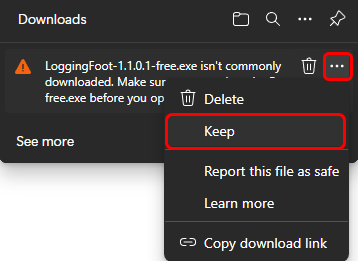
Move your mouse cursor to the upper‑right corner and the “…” menu will appear.
Click it to open the menu, then select “Save.”
Step2.
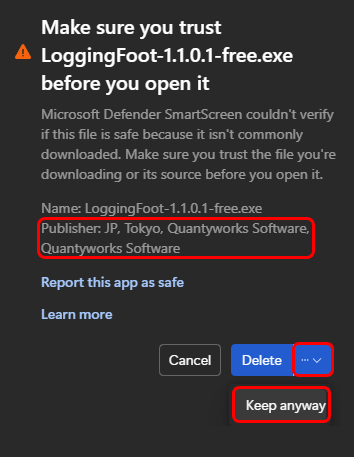
Please make sure that the publisher is shown as “Quantyworks Software.”
Next, open the dropdown menu to the right of the Delete button and select “Keep anyway.” The download will then begin.
SmartScreen Warning on First Launch of the Installer or Application
If Microsoft Defender SmartScreen appears when launching the MSI installer or the ZIP package for the first time, please refer to this page for instructions on how to proceed.